This blog is closed.
All the packages named Uberpack, Mods Collection Pack, and Shitload of Add-0ns are OBSOLETE and should not be downloaded. They have been replaced by Fusion Pack
Oct 16, 2010
Sep 5, 2009
Those fuckers at YouTube disabled my account 'luke650529' because of some fucking copyright issues.
That's not going to be a problem, in the future I'll create a new account for each video submission using temporary, disposable e-mail addresses, so is some video triggers the copyright bullshit and the account gets deleted, that wont affect my other videos*.
However, my old YouTube account being disabled does create a "past problem" because most of the videos linked in these pages aren't available any more, and I dont think I have local copies that I can re-upload (I had copies of some videos, but they were lost in a disk failure).
So, for videos posted before the date of this post, expect a "video removed for terms violation". As for future videos, I'll figure out something.
*the problem is, what if they ban my IP? I'll have to try how it works to upload through Tor or through some web proxy, burt anyhw, I don't have any video upload planned right now...
Aug 4, 2009
Using OpenGL on nVidia cards
NOTE:
This post is about nVidia only. I have no idea how to do this kind of stuff on ATI.
All the tweaks described in this post are intnded for use with OpenGL. They won't work on DirectX.
In Short
- Enable Perfect mode ([game] section: StencilBits=8 ; [Render_OpenGL] section: HardwareShaders=1),- Lower settings in conf.ini
- Lower the screen resolution.
- Use nHancer to compensate for the loss of image quality caused by the lwoer resolution.
The result is usually a better looking game than it would be running at the native screen resolution with Excellent mode.
And now for the long version.
First of all, Enable Perfect Mode
Also make sure that you have 4.09 DLLs.Lower Settings in Conf.ini
Use stuff like Effects=0 Water=0 Sky=1, ( [Render_OpenGL] section),Also, set LandGeom=3 to get a much better terrain, but make sure that you have the 4.09 DLL's, as LandGeom=3 won't work on the old 4.08 DLL's.
(NOTE: you DO have 4.09 DLL's if you have the Uberpack installed. If you're not sure, visit Mission4today.com and search the download section for 4.09)
Lower the screen resolution
I KNOW what you're thinking: Lowering resolution on an LCD monitor will make the game look like shit!Indeed it will, BUT if you have an nVidia card you can use nHancer to tweak your video settings (I guess there must be an ATI equivalent but I dunno what it's called)
Next thing to do is to figure out how to use auto-loading profiles, or simply flag your profiles 'can be loaded manually' ... maybe I'll even post more detailed nHancer instructions... but I probably won't, so play with the settings, read the notes embedded in the nHancer interface, follow the links and read more... and eventually find out what works best for you.
These Settings Should Work:
As a guideline, I can tell you that according to my own experience (Core2 Duo e6700 and GeForce9800GT), you can lower the resolution all the way down to 800x600 (or the wide-screen equivalent) and still have a game that looks fairly good, using the following settings:(nHancer first tab)
Antialiasing Combined Mode 8xS
Anisotropic filtering 16x
Gamma correction ON
Transparency antialiasing: NONE
(everything else: application)
(second tab)
All optimizations OFF
(third and forth tabs)
All defaults
Set vertical sync on Application or ON
In both cases FPS will be synchronized to the vertical refresh rate (IL-2 has built-in vert sync), and the synchronization will effectively limit the max FPS to 60 (or72, or 75... depends on your vertical refresh rate)This is good because CPU and video card wont use all the available resources trying to pump useless FPS (your eye cant tell the difference between 30 and 130 FPS anyway)
The idea is to trade screen resolution for Perfect mode + LandGeom=3, which wouldn't be worth it if it wasn't for the 8xS 'combined mode' antialiasing enabled by nHancer, which combined with 16x Ansiotropic filtering makes the game look... well, not really as good as it would look on a high-end machine but it still looks better than it does on the same machine on Excellent mode.
And as we're talking abouot that kind of stuff, here comes a NOTE
For those who always crank the settings all the way up
As long as you're running at your native screen resolution, 4x antialiasing will do fine, and if you need to save resources you can run 2xQ and it will still look good.
Only use higher antialiasing settings if you need to compensate for lower screen resolutions (which have both pros and cons, more on that in a futore post... maybe)
As for the Anisotropic filtering, you may want to crank it up to 16x if you have a high or 'highish' end box, or if you have to compensate for lower resolutions, but if you;re running at your native screen resolution, usually 8x will do just fine.
Good luck, and remember these two things:
1 - Don't expect everything to work perfectly right away. Those are the settings that work on my box with my OS and my settings, and the combinations are so many that in practice every computer is unique (well... almot). So test and tweak, then test more, tweak more. It takes patience (back ups help, too)
2 - You can't blame me if you screw up. Understand?
Jul 29, 2009
Will Storm of War make IL-2 obsolete?
Download Uberpack 3.1
Uberpack news
Uberpack Info
Don't worry.
IL2 will keep going strong for YEARS.
SoW will only feature one map and three or four flyable planes at first, and the first upgrade planned after BoB would be Koeran War.
It will take quite a long time for SoW to cover the whole span of WW2 and all the theaters and operations that are currently covered by IL-2, so what we do while SoW only has BoB, and even when it has Korean War, if we want to fly Pacific War missions, late war missions, the Med and Africa, etc?
We'll keep playing IL-2, that's what.
Oh, and BTW, if you install the AAA's Unified Installer or (even better) my Uberpack v.3.1, you DO have both 4.08 and 4.09 and can switch back and forth with a simple copy-paste.
I think that a new modded 4.09 will be published when 4.09 stable is released, and I'll update my uberpack to include it so you'll be able to use 4.08, 4.09beta and 4.09 stable (for the official AAA version you'll have to wait for a new version of their useless "i'll-copy-and-paste-for-you' program) but eventually we'll all play 4.09 stable. The only reason why we have 2 version being used at the same time is because the 4.09 beta is a beta, but once the stable is released, all the servers will go 4.09. You don;t see many 4.05 and 4.07 servers still around, do you?
Uberpack news
Uberpack Info
Will Storm of War make IL-2 obsolete?
Don't worry.
IL2 will keep going strong for YEARS.
SoW will only feature one map and three or four flyable planes at first, and the first upgrade planned after BoB would be Koeran War.
It will take quite a long time for SoW to cover the whole span of WW2 and all the theaters and operations that are currently covered by IL-2, so what we do while SoW only has BoB, and even when it has Korean War, if we want to fly Pacific War missions, late war missions, the Med and Africa, etc?
We'll keep playing IL-2, that's what.
Oh, and BTW, if you install the AAA's Unified Installer or (even better) my Uberpack v.3.1, you DO have both 4.08 and 4.09 and can switch back and forth with a simple copy-paste.
I think that a new modded 4.09 will be published when 4.09 stable is released, and I'll update my uberpack to include it so you'll be able to use 4.08, 4.09beta and 4.09 stable (for the official AAA version you'll have to wait for a new version of their useless "i'll-copy-and-paste-for-you' program) but eventually we'll all play 4.09 stable. The only reason why we have 2 version being used at the same time is because the 4.09 beta is a beta, but once the stable is released, all the servers will go 4.09. You don;t see many 4.05 and 4.07 servers still around, do you?
Jul 6, 2009
Widescreen and IL-2
Widescreen and IL-2
Posted by neuro: Mon Jul 06, 2009 9:20 am Post subject: Re: Wide screen monitor and IL-2
You don't get any extra bit of vision.
In fact, you get a slightly smaller field of vision (in the vertical) and the exact same horizontal field of vision (30 through 90 degree, default 75).
You don't get any extra bit of vision.
In fact, you get a slightly smaller field of vision (in the vertical) and the exact same horizontal field of vision (30 through 90 degree, default 75).
Too bad setting Use3Renders=1 and SaveAspect=1 doesn't work with widesreen (i heard). I guess it could be done with a mod: making the central 4:3 'square' of a widescreen monitor display the game as it would be on a regular monitor, and add the 2 side 'slices' as FoV degrees.
OK, I'll never be able to explain what I mean. I'm trying to make a couple of pictures (that would be worth 2x1000 words, no less)
OK, I'll never be able to explain what I mean. I'm trying to make a couple of pictures (that would be worth 2x1000 words, no less)
This is what widescreen 'should' do
 Hopefully (for you, I dont need it) some modder will make a mod that does this
This is what widescreen actually does
 and it's also the reason why I won't buy a widescreen
I understand why they did it, bigger images at a higher resolution means that the pictures look great. However, from a gamer point of view, field of vision is more important than image size (not mentioning that images would be bigger anyway, as some of those monitors are way 'taller' than the biggest available 4:3.
Now, I guess that on a lot of games you can decide by yourself whether you want the bigger images or the greater FoV, but in IL2 the only option you have is the one that not only doesn't give you back any of your peripheral vision, but also takes away another little bit, from the up-down direction.
What we'd need is a mod that allows the game to run properly (i.e. without black stripes on the sides) using SaveAspect=1 and Use3Renders=1 on a widescreen, or in other words, trick the game into believing that the widescreen is actually 3 monitors (hmm I wonder if one widescreen in the middle, and 2x 'vertical' 19'', rotated 90 deg to one side... ).
Jul 1, 2009
quasi-modded keyboards
Posted by neuro: Wed Jul 01, 2009 6:03 am Post subject: Re: Moving Axis Flight Simulator
Idea shamelessly stolen from http://www.rogerdodger.net/diyflightsims/keyboard_mod.html

- 1 : the 'half-modded keyboards, one per side.
- 2 : pieces of plastic boxes to cover some of the unused keys.
- 3 : tripod built out of junk with joystick taped on top
- 4 : another piece of junk holds the tripod 'thingy' in place
- 5 : paper 'pages' to cover the 'flashing square' bug that Oleg refuses to fix. (3 'pages' of different sizes for different resolutions. The one in position is the middle one, used for 1024x768x3)
6 : yet another 'junkbuild'. this one holds the 'page' in position
7 : a 'back-of-the-head' model headset attached to my TrackIR hat so the earphones are 'suspended' without needing to use my ears tohold them in place. Seriously. I bought it because I don't like having my head 'squeezed' by a regular headset, but the alternative feels like *very* heavy glasses (uncomfortable), so I invented the 'hat-suspended' thing. Damn, I'm good.
8 : what you think I did when I needed something to support part of the weight of my right-hand side monitor? (did I mention that I have a whole room dedicated to junk storage?)
_______________________
It's basically the keyboard mod concept in a 'neuronic' interpretation.
I thought I liked the keyboard mod BUT I dont want to switch keyboards back and forth every time I play, because the back side of my box isnt very easy to access, so the first thing I did was to find out whether you can have several keyboards plugged in at the same time. turns out you can, but they're all always active, the OS doesnt really care what keyboard a keystroke comes from.
I plugged in three keyboards, one PS/2 and two USB's, left the middle one alone because that's the one I need for typing, and started messing with the other 2.
They are oriented at 90 deg to the main keyboard, one with the keypad up and one with the keypad down, and placed at the two sides of my seat, one along my right armrest and the other one vertically on the left side of the desk, between the throttle quadrant and the box.
Then I reassigned the keyboard controls and placed labels on the keys as I went, trying to avoid regular letter keys and concentrating on the non-alphanumeric keys, and finally covered the lower part of each keyboard with cutting from plastic boxes.
So now I have the two 'upper' sides of 2 keyboards on the 2 sides of my seat, with a lot of nice labeled buttons. Looks horrible but not worse than the rest of my 'junk cockpit'; my attitude has always been 'if it works, it's OK, and this thing works.
Next sept would be to color code my buttons to find them more easily. For now they are grouped per type (engine controls all in one place (almost), controls such as chocks, wingfold, tail hook, etc, all in one place, and so forth. I still need to actually read the labels but with color coding and some experience I should learn to use all the buttons almost without looking.

Jun 28, 2009
iWear vs Projector vs Mutimonitor
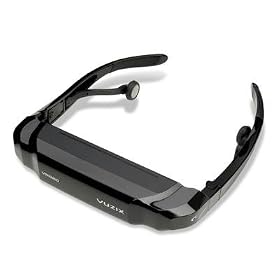
The iWear is basically a shades-thingy that suspends two mini-monitors right in front of your eyes + a head tracker that makes the in-game view move around as you move your head.
It's a bit pricey but still much cheaper than a 220 deg. screen with 3 projectors, which would be a great idea but it would cost around $10000
Sounds Cool?
Well, not so fast.
I just thought of a big problem: peripheral vision.
Looking into the iWear would be like looking around you through a tube.
Imagine taking the cardboard tubes from a couple of TP rolls and look through them.
You would be able look all around but you'd need to turn your head even when you normally would only move your eyeballs.
At this point my 3 monitors (or even better the 220 deg semicircular screen) gives me back at least some of my peripheral vision: I have peripheral vision to the sides but not in the vertical.
The perfect VR helmet would have 3x mini-225 deg screens on top of each other, at maybe 2 inches from your nose, for a combined 9 game screens in 'tic-tac-toe configuration' with the central one being the original game screen and the 8 screens all around would provide peripheral vision.
Besides the technical details such as finding out how big the screens should be and at what resolution, what distance from your eyes, what display technology to use, etc, etc, etc, 'the' problem would IL2 not allowing a 9-monitors configuration.
I mean, you can use 9 monitors with IL2 but it would look like a huge version of your regular monitor, no FoV change.
IL-2 can extend up to 270 deg FoV in the horizontal but the vertical FoV can't be increased, so you'd be able to use one semicircular 'miniscreen' into the helmet and display three 4:3 screens side by side with Use3Renders=1 and SaveAspect=1, but you can't add 2 more 'miniscreens' above and below the first one, for the simple reason that there isn't any Use9Renders option.
So
After considering the above, I think I will stick with my 3 monitors because of the partial peripheral vision being surely better than no peripheral vision at all (it takes a real short time to get used to the distortion caused by 'squeezing' 225 deg. of FoV into some 45 deg of RL FoV)
- The best solution would be the 3 mini semicircular 225 deg screens in a highly modified (possibly custom built) helmet, but that would be very difficult to do and IL2 wouldnt allow 9-screen view (modders? you there?), and there would be a bunch of technical problems (see next point)
- Next best would be one 225deg 'miniscreen' into a helmet with everything else being pretty much the same as seen in the iWear+ helmet setup. Now that would probably work with IL2 but the technical problems would still be pretty big: what technology to use? What resolution? What screen size? What distance from the user's eyes? (and more)
- One step below that, the 225 deg screen with 3 projectors is feasible and it has been done, too bad it costs $10,000
- One more step down: three huge monitors. Too bad they must be 4:3, and no-one makes those any bigger than 19'' any more
- Next step: 3x19''. But I have that already.
Anyhow, No iWear, NO.
It looks cool and it IS pretty cool, but I want my (partial) peripheral view, so the display upgrade (if ever) will be in the direction of the huge 225 deg screen with 3 projectors.
Corsair: in-game vs. RL
However, after the first testing session I thought I'd had enough and went to play on line, planning to finish the testing later on.
Now, as a bunch of days have already gone and I haven't resumed the testing yet, I'm posting what I have and encouraging anyone who feels like doing such a thing to finish the work and possibly correct the details that I have gotten wrong.
It is still possible that I will resume the test myself, but doing two or more separate tests woudnt be duplicate work anyway, as tests would be run by different people on different computers, different setups, etc, provide more valuable info, so please do re-fly my tests and report your result + possibly fly new tests based on the same concept.
Also help me find more training movies and/or original manuals so we can do the same thing for other aircraft.
Here are the results from the first test session, flying the Model C Corsair and comparing results to the data from the training movie.
_____Supercharger vs blower______
the in-game supercahrger settings 'position 1', 'position2' and 'position 3' seem to activate the blower settings of the RL plane:
Pos.1 = neutral blower
Pos.2 = low blower
pos.3 = high blower
The in-game model has animated trim handles (left of the pilot seat) but doesn't have animated indicators, so we don't know exactly how many degrees of trim we have set.
________TAKE OFF SETTINGS______
- cowl flaps 2/3 open (rad. pos. 6 for us)
- rudder trim 6 deg. right
- aileron trim 6 deg right wing down
** NOTE: in oder to do the last two with sufficient precision, you'll need to have ail. and rud. trim on sliders.
** NOTE2: our in-game trim handles (on the left side of the pilot's seat) are animated but the indicators are not (!) so this may require some practice ... or a modded cockpit. (You hear that, modders?)
- elevator trim: 1 deg nose up
- lock tail wheel
- flaps up (flaps are used for short take off e.g. from carrier)
- prop in full low pitch (prop 100% for us, unless you do what I suggest and have prop on a slider and "prop x%" messages hidden)
_____Runway Take off_______
- 45 in. pressure
- 2700 rpm
** NOTE: 45 in. pressure is a whole lot lower than full power!
** NOTE2: use more power as needed on on short runways etc, up to 53 in. pressure.
- lift the tail and let the plane gain speed without pulling it off the runway: it will fly off it on its own (IF you have the correct trim settings,that is)
- make sure you have enough speed to take off (the movie doesn't say what's the take off speed. I guess it's just 'the speed at which the plane will leave the ground, with those settings', which will vary according to fuel/ordnance/weight/added drag/whatever)
- Set throttle and RPM
- pick up the wheels
_____Carrier take off (or short take off)
- half flaps = some 30 deg (take off flaps for us... unless you have flaps on a slider, which would be adviceable)
- 6 deg right rudder trim
- 6 deg right wing down aileron trim
- 1 deg nose up elevator trim
- full power
- hold brakes. careful or it will tip over (no worries, our in game planes won't tip over. Also we can (and should) throttle up with chocks in, instead of holding the brakes)
- release brakes and take off.
- don't pull up too much, let the plane fly off.
- pick up wheels
- retract flaps at 110/120 knots min. (the Corsair's airspeed indicator measures knots. 110 Knots = ~205kph or 125mph)
___Take off differnces__
- we don't have a way to tell when we have trimmed the aileron and rudder to extactly 6 degrees.
- from my experience, it results that often the in-game Corsair doesn't need aileron trim (or sideways stick action) o take-off. Only some right rudder.
- we can't tell when we have exactly one deg. nose up, but I guess you could use 'a little bit' of up trim.
- as we often take off without that slight nose-up trim, we may need to pull up a little bit on take-off, rather than simply let the plane fly off as in the movie.
- we don't need to be careful with the throttle when revving up with brakes (or chocks) in. Our in-game model won't tip over anyway.
_____CLIMB_________
- military climb at ~3000ft/min: full take-off power (limited to 5 min)
**NOTE, in game the limit may be different. I'll have to test that too
- normal rated power 43.5 in, 2550rpm, neutral blower (i.e.superch. pos. 1) at 125 knots.
**NOTE According to the training film, this climb would give you a ~2000ft/m climb.
**NOTE2: the movie doesn't mention any climb speed. Trying to keep a steady 2000ft/min climb at the normal rated power settings resulted in an airspeed of about 180 KIAS (330kph or 205 mph), at 20,000 feet and 160 kias at 25,000
_________________TODO_________________
- find out what's the best altitude to switch supercharger to pos.3 (the movie's 13,500 is almost centrainly too little but the aircrafty guide's 26,900ft is probably too much)
- type data about cruise, combat, landing, etc. from the movie
- find and point out differences between movie data and in-game model
- add more details about the diffrences betwwn RL and in-game cockpits
- Find out how long it takes for the 'engine: overheat' message to appear, at various settings (RPM, cowl flaps)
- Test normal rated power climb at lower alt, find out speeds for 2000ft/m climb at deck, 3000ft, 5000ft, 10,000ft, 15,000ft
- Try to figure out the optimal climb speed (use data from IL2-Compare?)
- Find out max dive speed
- fly the same tests on different Corsair models and note the differences
- same as previous point, with different fuel loads.
- same testing with different ordnance/configurations
_____seriously, though___
Consider contributing to this work because I will probably resume it after a long time (or never)
Doing (or at least starting) a similar work for other aircraft would be an awesome thing to do.
Jun 8, 2009
Radiators vs Cowl Flaps
Posted: by neuro Mon Jun 08, 2009 2:24 pm Post subject: Re: Superchargers, rad settings.
One of many games limitations for some reason (probably the limitations imposed by 2001 computers) our in-game cockpits only have a limited amount of working features, many of the lights and gauges are only 'painted' on the dash and almost no switches and handles actually move when operated from the control key.
The lack of visual input caused by these 'partially realistic cockpits' has been compensated for using those on-screen messages such as 'radiator: position 2', etc (In fact, it was totally overcompensated, with the addition of useless and counter-productive messages such as 'Power: XX%'. See here how to change that)
While water-cooled engines such as the Roll-Royce V12 and the DB600 series use radiator shutters to regulate the flow of air through the radiator(s), air-cooled engines (e.g. radial engines) use cowl flaps to increase or decrease the flow of air through the cylinders (as shown in the picture posted by BAM)
On RL plane you would have your control marked 'radiator' or 'cowl flaps' (or something else) according to the plane model, but in game we switch back and forth between air-cooled and water cooled engines all the time, and it makes sense to have the same key controlling radiator shutters and cowl flaps because they do pretty much the same thing (control the quantity of air used to cool the engine, directly on the cylinders or indirectly, cooling the radiators)
And here is where our 'semi-realistic cockpit' and the on-screen messages used to (over)compensate show a shortcoming: using the same key for cowl flaps and radiators means that the same on-screen message has to be spawned when the key is pressed, that message reads "radiator: position XX", and most of the players that aren't familiar with colwl flaps vs. radiators tend to assume that all planes have radiators which are 'open or closed' from the cockpit (actually, you don't open the radiator itself but the shutters that regulate the flow of air on it).
In the controls page, the key assigned to the red control is marked 'Radiators/Cowl Flaps' but for some reason the on-screen message only talks about radiator.
They could have made the message something like "Rads or Cowl Flaps: pos. x" (in the 'slightly less unrealistic version' those messages read "R: x") but for some reason they made made it "Radiator: position x", maybe they didnt want to use shortened words such as 'rads' and 'pos', and the option of using something like "radiators or cowl flaps: position x" was discarded because it's too long: they decided to pick one and they picked 'radiators'.
Hopefully, in next game we'll have ore detailed cockpits with more working instruments and animations, making on-screen messages completely unnecessary (but I bet they'll be implemented anyway and we'll have to manually disable them).
And there you have it again: yet another novel sized post to say something that couple be said in 2 lines. (should I try to become a politician?)
May 30, 2009
Toggle Rear View Mirror
If you can't see any rear mirror in the planes that should have them, you want to bind a key to "toggle Mirror".
Posted by neuro: Sat May 30, 2009 10:28 am Post subject: Re: Help pls
Posted by neuro: Sat May 30, 2009 10:28 am Post subject: Re: Help pls
Note that the 'toggle mirror' key has 3 possible settings and only with one of them you will see all the objects in the mirror (the other 2 hide friendlies and hide ground objects, IIRC... but that's not important because you want everything displayed anyway).
I think the "show all" setting is one toggle after 'hide mirror', so my personal solution to this was to set a key for toggle mirror, make sure that I could see everything, and then map that key to something else, leaving the mirror always toggled
I think the "show all" setting is one toggle after 'hide mirror', so my personal solution to this was to set a key for toggle mirror, make sure that I could see everything, and then map that key to something else, leaving the mirror always toggled
May 26, 2009
Don't Lower The Goddamn Sensitivity!!!
Posted by neuro: Tue May 26, 2009 9:06 am Post subject: Re: Spitfire MK IX
The joystick sensitivity can be changed in the conf.ini file.
However, that's fairly difficult to do manually, even for those who prefer the raw text to shiny interfaces: there are many values and the only way to know what each of them changes is to count places, as in the third value from the right in the second row... huge PITA.
The solution is a nice little program called JoyControl that is available for free download at www.mission4today.com , you tell the software where your il2 install is (only the first time, then it will remember it), and you get a nice interface with curves and testing and everything. Just install it and click around, it's extremely easy to figure out.
Now for the actual settings: I have heard this thing about lowering the elevator's sensitivity a number of times and every time I have pointed out that I am absolutely against it.
The right way is to learn to control your hand, not to lower sensitivity.
Lowering joystick sensitivities you will get a plane that is easier to fly and stalls less... but at what price?
The price is, for instance, that you won't be able to pull an extremely tight split-s at 100m off the ground and make your enemy crash (btw, to do that in a Spitfire you need to have flaps on a slider), you won't be able to pull a snap roll and make a Spitfire roll faster than a 190, you will lose much of the 'contact' with the plane (which is already very little, in a simulator), in other words, as I often say, you end up with a "plane on Valium".
That's definitely NOT what you want.
You don;t want a plane on Valium, you want a plane that stalls and snap rolls easily and have full control over it.
Do you really think that Supermarine engineers (or any other fighter planes designers) couldn't make a more forgiving, easier plane to fly?
Sure they could, but that would be a trainer, not a fighter.
Fighters trade stability for maneuverability and are supposed to be flown buy expert pilots.
So, DO NOT lower your sensitivities but learn to control your hand's movements.
Personally, it is my opinion that the most realistic sensitivity settings are "all 100's" meaning setting all the 10 sliders in the JoyControl interface, all to 100 for each of the three axes. Those are my settings, and you don't see me stall a lot, do you?
What does 'all 100's' mean in practice?
The IL2 sensitivity control divides the joystick range in 10 concentric areas, independently configurable.
This means that the default sensitivity 10, 20, 30, 40 .... sets sensitivity to 10% when the cursor is within 1/10 of its travel from the center to the edge: you move the stick by '10' and the cursor moves by '1'.
Sensitivity is then raised to 20% between 1/10 and 2/10 of the way towards the edge: you move by "10' and the cursor moves by '2'...
And so on, increasing by 10% for each 1/10 of the way, until the sensitivity is "direct" or 100% only in the last 1/10 of the way, when the cursor is closest to the edge, you move by '10' and the cursor moves by '10'
Now, as you probably have figured out already, it is my opinion that the joystick control should always be "direct": the cursor should always move by '10' if I move the stick by '10'.
The settings to achieve direct control are "all" 100: as each slider controls 1/10 of the way from the middle to the edge, we set them all to 100% and keep full (or 'direct', or 1:1) sensitivity all the way from the center to the edge.
Now, someone would argue that different planes require different sensitivities, but I'm not convinced of that. Different planes have different sensitivities in the sense that each plane has different reactions to the same movement of the "virtual stick" that we see in the cockpit, buw we are talking about controlling the in-game 'virtual stick' through out physical joystick, and the ratio between those two should always be 1:1, meaning that if I move my stick say 10% of its total allowed movement, I want the in-game stick to move 10% of its total allowed movement, and nothing less.
Sorry for the long and probably unnecessary multiple explanations, the reason is that I don't seem to get this point across. I hope I made it clear enough, this time.
May 15, 2009
How to use the rudder
| the first rule is "step on the ball": the ball goes right, apply right rudder to keep it in the middle, the ball goes left, keep it in in middle with left rudder. When the ball is off the center, your plane is sideslipping, i.e. not going straight forward but drifting to one side (the side where the ball is). Imagine being in a boat and rowing across a river with a fairly sustained current: your boat points straight ahead but you will actually travel diagonally because of the current. Now imagine using a rudder to point the boat in the direction of it's actual motion. You're 'keeping the ball centered' As a rule of thumb, you want to apply rudder in the same direction of wing bank: bank right, right rudder; bank left, left rudder. That's for 'regular' turns, which are called 'coordinated' when bank and rudder actually match and the nose is pointed in the direction of travel. Too much rudder and the nose will point to the inside of the turn, too little rudder and it'll point outside of it. You can use this knowledge to your advantage later but first you have to learn coordinated turns Now for a bunch of practical uses. First of all you use your rudder when taking off or landing: as the engine spins the prop in one direction , torque tries to turn the whole plane to the opposite side. This means that one wing will try to strike the ground. In game, this effect is WAY undermodeled and only happens when airborne, while in RL even a light plane has more torque than than our in-game models, and it starts working already on the ground (prop wash is added to it, but let's consider the whole thing as 'torque' for simplicity) So what happens is that as soon as you leave the ground one wing tries to drop, and the instinctive reaction is to use aileron to correct. WRONG! You correct that with rudder. Correcting with aileron can lead to a snap roll 50ft off the ground, also known in layman terms as 'certain death'. Same on landing. Correct with rudder and throttle, use aileron and elevator as little as possible. A neat trick: get some speed and altitude, then quickly apply full aileron to one side, full rudder to the other side, and add elevator in a direction of your choice (you may pull up or push down, both should work) Congrats, you just performed a snap roll and at the same time realized why it's called "snap" roll. If you learn to control this maneuver well enough it will give you an enormous advantage especially in evasive actions. I pointed out the snap roll because they can (and do) happen accidentally if you do the 'instinctive' thing instead of the right thing. Coordination between aileron and rudder is essential to avoid accidental snap rolls. Yet another very useful rudder trick: as you apply rudder to one or the other side the vertical control surface pushes your tail to the opposite side, which obviously means that your plane's nose points to the same direction of the pedal you push. I leave it to you to figure out how you can use this to aim. More (damn, I have at least 10 more interesting things in mind... I don't think I'll type that much though). In a sufficiently steep turn (high bank angles) your rudder is almost parallel to the horizon, so you can use it to point the nose up or down (climbing turn or diving turn... or the most difficult of all, which is keeping your altitude and speed). In other words, when the plane is banked at extreme angles, you can use the rudder as elevator. You can use your rudder to slow down your plane or to make it dive more quickly without overspeeding: The technique is called 'crossing controls' and it's as simple as applying rudder to one side and aileron to the opposite side. This makes the plane sideslip, which increases drag, which in turn slows you down. If you find yourself too high and too close to the runway where you want to land ... the right thing to do is to go around and fly a proper landing pattern. but as we don't really risk our lives (or anyone else's) and there are no authorities that can ground us (except for admins, I guess), flying the "Sarajevo landing" may be a fun thing to do. OK, so you're approaching a runway and your combined amount of altitude, distance (lack thereof), and speed makes the approach path way too steep. First thing to do is to slow down to a speed where you can safely drop flaps and landing gear. Chop the throttle, cross aileron and rudder and slow down. Now drop full flaps and landing gear to increase drag and slow down further. At this point you lift one wing and add rudder to the same side of the wing that you lifted. This will increase your descent rate by anything between "not really enough" and "woah! WAY too much" depending on a number of factors (if you can't lose altitude fast enough, consider doing a couple of S turns or even a 360) Note that your plane will sideslip A LOT so don't expect it to go where the nose is pointed at, but much more to one side. Sometimes you may need to "switch sides" (lift the other wing, rudder to the other side) to keep that high rate if descent without missing the runway. When you're just above the ground, center aileron and rudder and put her down. OK, I'm tired of typing so I'll leave it to someone else to add more "fun ruddder stuff" that you can experiment with ...and possibly correct the inevitable mistakes in my post: I'm not a flight instructor after all. In fact I never even got a license (and probably won't. Long story) So, have fun with your rudder and let us know how it's going. | |
May 5, 2009
Run IL2 on a Mac
NOTE: This post is the answer to a guy who wants to run IL2 on a MacBook with 4GB of RAM, but it would work for any Unix-based systems (Mac, Linux, *BSD, etc).
You need at least 2GB of physical RAM to do this. Much better if you have 3GB or more.
Postedby neuro: Tue May 05, 2009 7:10 pm Post subject: Re: My stats stink because of.....
You need at least 2GB of physical RAM to do this. Much better if you have 3GB or more.
Postedby neuro: Tue May 05, 2009 7:10 pm Post subject: Re: My stats stink because of.....
You have to install a VM (Virtual Machine) inside your Mac, install Windows in your VM, and IL2 in your virtualized Windows.
A virtual machine lets you install a whole OS that runs in a window. maximize that window, and there you have it: "Win-in-Mac".
One virtualization software that offers the a good overall performance and at the same time is pretty straightforward and easy to use is VMware, which costs money. Another problem, at least it is for some of us, is that VMware is closed source (no access to the source code) meaning that _anything_ could be in there for, what we know... but on the other hand, that's true of Windows and MacOSX too.
The good news: VMware supports 3D acceleration, so you can play games on a Mac (and on almost any other OS, for that matter). It's very easy to set up and use.
There are many software solutions for virtualization, I don't know how many of them have a Mac version but some of them are open source, and if you can get the source code you can compile it for your OS.
Virtualbox is a fairly good alternative to VMware, it doesn't cost money but I dont think it's open source either. It's made by Sun Microsystems, same guys who make Java. I dont know if there's a Mac version, google it. It's not as easy to use as VMware but still not difficult. It does 3d acceleration but (at least on my Linux system) it has some issues.
Qemu is open source, meaning that even if there's no Mac version, you can always compile it yourself. on the other hand, it's not so good at 3D acceleration, it solves it ( *nix systems like Linux, *BSD, etc) loading a couple of kernel modules, but I don't know how you do that on a Mac
On the other hand, the Mac is Unix-based after all. Much of the 'magic' is very similar to *nix.
Qemu is also less easy to use, compared to Virtualbox and most of all to VMware.
Those are not the only existing options but the ones I could name right away (OK, I can name Xen too... but that's definitely not what's you're looking for). Do some research and figure out what's the best choice for you.
Whatever virtualization software you decide to use, some things are always the same:
You need a lot of RAM. I don't know how much RAM a MacBook has (I would never buy a Mac and dont understand why people do) but I know that you need at least 2G _for the VM alone_ in order to play games and get acceptable performance.
That means, you have to set up your VM to use up to 2GB of ram (more, if possible), and you need more memory to run MacOSX where the VM runs.
With a 4GB Macbook you should be OK. You can set your VM to use 3GB of RAM, and shut down all the programs that you don't need before launching the VM.
Or, you could set the VM to use up to 2GB of RAM and leave another 2GB for MacOSX.
This way you wouldn't need to shut down everything before launching the VM... at least for the RAM (but what about CPU?).
I would go for the "extreme" solution: 3GB for the VM and shut down just about _everything_ that isn't needed to keep OSX up. That would translate to max performance, but the bad news is that you'd need to go through a checklist before every gaming session
After the session, the easiest way to restore everything is to simply reboot, but going through your checklist "in reverse" would work too.
Also, tweak the Windows OS that you install in the VM: there's a lot of stuff that Windows runs by default "just in case", that you wont need on a gaming-dedicated OS. Have a look at http://www.tweakxp.com
Even if you tweak your virtualized Windows to the limit, and take the time to shut down everything that you dont need (on OSX) before launching the VM, games that run in a virual machine never have the same performance of the same game running on a "real" (physical) box with the same specification of your VM (in other words, you probably won't be able to run Perfect mode)
And of course, run XP in that VM. Dont even _think_ of running Vista.
NOTE: this is NOT a guide at _all_, I'm just pointing you in the right direction. Do your homework!
May 4, 2009
Use Perfect mode on midrange machine
Posted by neuro: Mon May 04, 2009 10:44 pm Post subject: Re: Awesome Bombers Formations (56k warning)
4.09 dll's + Perfect mode + LandGeom=3 is essential for the game to look acceptable.
If you run Excellent mode because of performance issues, you may want to try this:
- Get the 5-dll's pack from mission4today.com (search the download section for 4.09, or dll, or something like that)
- figure out which set of dll's is the latest one (if it isnt self-evident, try right-click > properties and see when they were made)
- Install the latest beta dll' (that was the point with figuring out which one was the latest one)
- Make sure that you're using OpenGL and NOT DivX
- edit conf.ini
- set:
[Render_OpenGL]
Shadows=1
Specular=0
SpecularLight=1
Diffuselight=0
Effects=0
Water=0
Sky=1
- Try the game and see how it works, especially low-level over cities (that's usually a good test. If you can stay over 25FPS there, you're OK)
If still problems, try lowering the resolution to 1024x768. (this WILL cost you something in terms of looks, but it will also give you a slight advantage as 'dot' planes will be bigger)
in case that doesnt fix it yet, consider the possibility of lower the resolution to 800x600 but that will make some details look horrible.
There is a (partial) fix tho: get nHancer (google it) and set Antioaliasing to "Combined mode", 8xS. That will give you a (barely) acceptable image quality even at 800x600, but you'll be able to run Perfect mode with LandGeom=3, meaning a much better overall visibility
Apr 26, 2009
Modded game shows up in Russian?
Posted by Luke the Nuke: Sun Apr 26, 2009 9:25 am Post subject: Re: Help
I solved the Russian problem long before the Unified came around, installing a GUI mod that makes it IL2-46 look like the old brown-orange interface of FB (which looks way better IMHO), it also happens to switch the game interface back to English, but it will NOT change the Russian ranks and maps in the dynamic campaign.
I looked for the game interface mod on AAA but I couldnt find it, so I pulled it from my game: download THIS FILE, extract the .zip archive, drop the Files folder into your IL2 directory and overwrite (you may want to back up your existing ...\Files\GUI and ...\Files\i18n folders).
To Switch the Russian ranks and maps back to English in the dynamic carreer you need to patch your DGen folder.
You can find AAA's fix HERE
Or, you can download THIS VERSION that I pulled from my own game, which will fix the Russian bug and also add hundreds (literally) of dynamic campaigns but not the skins for them, they'll use default skins
(get the skins at mission4today.com, look for EnjoyR skin packs)
Apr 25, 2009
Comms Advice
NOTE: This is the answer to someone who posted a nice guide to the use of in-game comms.
Posted by Luke the Nuke: Sat Apr 25, 2009 4:05 pm Post subject: Re: Effective Combat Communication
Good post and definitely needed, a guide for the 'comms noob' is a nice idea.
Here are a couple of things that I would like to point out. Lode covered most of it in his post but I think that insisting a little more on those points can do only good.
- The HELP! thing (game chat)
Lots of people on the game chat type "help!" or something like that, without specifying a position, like we were psychics who can guess stuff. You need help? You tell me WHERE to go, or I can't help you.
I dont expect you to type detailed descriptions with a bandit on your 6 but "c3 kp4 3k" is surely quicker than typing HELPHELP HELPHELP!!1!! FFS someone help me!!1"
- Location, location, location (game chat)
When trying to give your position as quickly as possible in game chat, you can skip typing relatively long words such as "grid position" and "altitude" and replace them with ... no words at all! The order of the values in the line tells us what they are.
If not specified otherwise, we assume the order to be 1 - grid position, 2 - keypad position inside that square, and 3 - altitude in meters. So, instead of typing "grid C-3, keypad 4, altitude 3000m" you can type "c3 kp4, 3k. Include heading whenever possible. 'thousand' is often shortened in 'k', altitude in 'alt', heading in 'hdg'.
- Metric by default (both TS and game chat)
As the game defaults to metric, altitudes and speed are assumed to be in meters and kph respectively, unless specified otherwise. If you dont specify, for instance, 5000ft (or 5k ft.) and only say that your altitude is "5000", we assume meters, not feet. if you tell us that your speed is "250' without specifying mph or KIAS, we assume kph. If you're talking about feet of altitude and/or mph of speed, you'll have to always specify the measurement in game chat or TS. Say only the numeric value and we'll assume metric measurements.
- Bogeys vs Bandits (both TS and game chat)
This happens A LOT, and should be corrected. Even fairly expert "virtual pilots" often say "bogey" but mean "bandit" (you hear that, Yammo? )
Bogey are _unidentified_
Bandits are _identified_ as hostile
Posted by Luke the Nuke: Sat Apr 25, 2009 4:05 pm Post subject: Re: Effective Combat Communication
Good post and definitely needed, a guide for the 'comms noob' is a nice idea.
Here are a couple of things that I would like to point out. Lode covered most of it in his post but I think that insisting a little more on those points can do only good.
- The HELP! thing (game chat)
Lots of people on the game chat type "help!" or something like that, without specifying a position, like we were psychics who can guess stuff. You need help? You tell me WHERE to go, or I can't help you.
I dont expect you to type detailed descriptions with a bandit on your 6 but "c3 kp4 3k" is surely quicker than typing HELPHELP HELPHELP!!1!! FFS someone help me!!1"
- Location, location, location (game chat)
When trying to give your position as quickly as possible in game chat, you can skip typing relatively long words such as "grid position" and "altitude" and replace them with ... no words at all! The order of the values in the line tells us what they are.
If not specified otherwise, we assume the order to be 1 - grid position, 2 - keypad position inside that square, and 3 - altitude in meters. So, instead of typing "grid C-3, keypad 4, altitude 3000m" you can type "c3 kp4, 3k. Include heading whenever possible. 'thousand' is often shortened in 'k', altitude in 'alt', heading in 'hdg'.
- Metric by default (both TS and game chat)
As the game defaults to metric, altitudes and speed are assumed to be in meters and kph respectively, unless specified otherwise. If you dont specify, for instance, 5000ft (or 5k ft.) and only say that your altitude is "5000", we assume meters, not feet. if you tell us that your speed is "250' without specifying mph or KIAS, we assume kph. If you're talking about feet of altitude and/or mph of speed, you'll have to always specify the measurement in game chat or TS. Say only the numeric value and we'll assume metric measurements.
- Bogeys vs Bandits (both TS and game chat)
This happens A LOT, and should be corrected. Even fairly expert "virtual pilots" often say "bogey" but mean "bandit" (you hear that, Yammo?
) Bogey are _unidentified_
Bandits are _identified_ as hostile
Awesome Bombers Formations on Sov
Awesome Bombers Formations on Sov
Posted by Luke the Nuke : Fri Apr 24, 2009 3:12 am Post subject: Awesome Bombers Formations (56k warning)We have been flying some great bomber missions lately. we have flown some B17 missions, some Soviet bombers, and some German planes too, but our awesomest sorties are probably the torpedo bombing missions on the Biscay Sweep map. We fly the Kawanishi H8K "Emily" 4-engine flying boats, that on this map is supposed to represent the Short Sunderland.
Our success rate is somewhat in between a miserable failure and a catastrophe: we sink something like one ship for every 10 of our planes shot down (statistics "officially" made up on the spot), but we have a lot of fun... and we sure look good!
We look good when we're outbound, I mean. Much less after the battle. But anyway, here are some screenhots from a couple of missions that we flew last night.
I can't see all the names on my ntrk's and I dont remember exactly who was there and who wasn't, so I won't be able to name everyone. Sorry about that. Oh, and I can't see the enemy's names at all, so I cant name those who flew for Germany, but thanks for the great fun to everyone who participated, on both teams.
The fearless Torpedo Bombers:
 Yammo, wing leader flies the H8k n.1 in Japanese markings
 Luke "the Nuke" in the H8K n.90 and British markings
 Textide flies the American H8K
 Rebell in the British H8K marked EG-A
 The unmarked H8K n.11 is Blob
 Garakuta in the other American H8K, attacked by an FW
More bombers joined the formation as more players saw what was going on. A couple of times we managed to launch really big formations... but I don't have any ntrk of those.
the Little Friends who escorted us:
Lucky-Luke in the Spitfire n.13; Hoogs, Spitfire n.8; Winstrol, Spit ZZ-Z; Foxbat, Spit FN-Z; Cmmdr.Spork, spit n.01; Nervicamen, Spit n.71; Pik50, Spit n.50; and of course all those who didnt get their name on my screenshots, thx 4 great game!
The mighty Luftwaffe
Pirates_Smile, FMCCWarrior, Sasparaitis, NNL, Slovan, AngryPenguin, Ishotyou ...and many more. They flew a mix of 109G's and 190A's... and I must say that they did a good job. I didn't make it home even once, and I guess it was pretty much the same for most of us Brit bombers. Great game LW guys!
The Battle


Forming up

Do we look good, or what?!?


Our 'Little Friends' in action


a 109 goes down in flames

Luke is hit in one engine

Trying to get back into the formation

Yammo slows down the formation so Luke can rejoin

Luke's damaged engine slows down the whole formation


We are constantly under attack


We try to keep a tight defensive formation


As more planes get damaged, staying formed up gets more difficult


Rebell takes some hits


Luke's engine eventually gives up

At this point our formation is broken

Luke goes down

No wing and no tail... but survived

ARGH my smokes are all wet! it's be a long wait for the rescue boat...

yammo is badly damaged but still flying


Textide loops in the H8K 0_0

Blob is dewinged

Yammo is on fire but doesnt give up

Another Focke attacks him ...and is dewinged by his gunners

But Yammo won't jump. Not before launching his torpedos

But the abused Emily can't take any more
Well, and that's pretty much all I had on my ntrk. I don't know what happened to Texide after that loop, all I know is that almost everyone else went down, including myself... but it was great fun!
BTW, those were screenshots from one particular mission... and not a particularly successful one. I had to chose one mission and took that one because it had most planes catching fire... and I had to leave out a lot of goos screenshots because the post is already huge as it is and if I included all the cool shots it would be like 10x as big... so I guess you got it: the best way to appreciate this kind of stuff is to actually fly there, no matter what team you choose, both roles are fun and challenging.
Thanks AAA for the mods, and a particular thanks to the guys who made the mods featured in these screenshots: Flushy's cloud mod, Avala's Planeshine and cirrus textures from mapmod, Propeller-mod-V2.0, Guncam New Fire Ultimate 3d smokes, McWolf Decalshine, Mvn HitEffect mod, Waterspalsh V1.1b, tracermod_RZL, and thanks also to the authors of the mods that aren't visible in these particular screenshots.
Sorry for the missing nicknames (well I mentioned the mods' name, anyway) and thanks to the "unnamed" as much as the "named" authors.
__________________________________________________________
Most comments are positive, some ask whether we'll be doing it again, some discussions about tactics get started
__________________________________________________________
Posted by Luke the Nuke: Sat Apr 25, 2009 4:58 pm
Posted by Luke the Nuke: Sat Apr 25, 2009 3:16PM
| Well I guess we'll be doing that A LOT. We have fun doing it, all of us, bombers, escorts and enemies, so why not doing it again. whenever we have 4 or more players on comms and a map with bombers, that can be done (but otoh doing it too often might take part of the fun away) I think we should try to improve the attack part. We have at least one good leader for the navigation part. We'd need a 'vice-Yammo' to lead us when he's not around, but when yammo is there we are usually able to fly fairly tight formations: the first couple of times we could only stay in formation as long as we flew straight and level but now we're getting better at changing heading and altitude thanks to Yammo announcing the new heading and alt in advance. Maybe it would get even better if he could also announce bank angles, airspeeds, and possibly his target vertical speed before initiating turns and altitude changes respectively. That would enable us to stay formed up tighter all the time, increasing our combined fire power ("the whole is greater than the sum of its parts" seems to apply very well to bomber formations' firepower) Another thing that we can definitely improve is the attack. Usually, we switch to a line formation with 1 km separation, dive down and launch. This is IMHO a good technique for attacking cars on a road but I'm not sure that it's the best way to attack ships, especially when the ships become invisible at torpedo-launching altitude (fog). Now, I don't really know what I'm talking about, I'm just trying to throw in some new ideas: if we used high flying fighters as recon planes they could stay in contact over TS and provide us with the exact location of the ships including their orientation. That would mean being able to choose the best heading to maximize the chance of a hit (approaching from the side of the ship) while at the same time releasing our torpedoes from a greater distance (approaching a ships from the side means flying into a LOT of enemy fire) My idea for this kind of attack is to fly low over the water and keep the usual 'finger four' formation. If we have more than 4 bombers, the extra aircraft would join the sides of the formation, making it wider, if the number of bombers is great enough we would fly several finger-fours side by side. The idea is to have as many bombers as possible flying side by side and approaching the ships from the side (yes I have considered flying wingtip to wingtip, but the finger-four is easier, especially with the limited field of vision of a computer screen). High-flying fighters would guide us into an approach from the side of the ships, trying to position us to maximize the possibility of torpedoes hitting another ship if they miss their intended target (I hope you get what I mean, because I can't really explain it clearly. Not clearly _and_ shortly, anyway) We wouldn't even need to actually see the ships (kinda difficult in that peasoup anyway), all we would have to do is to play "follow the leader", and the leader would follow the directions from the high flying recon-fighters. They would tell us when we are in the correct position on the grid and flying the correct heading, we would release all the torpedoes all at the same time and keep on following the leader as he turns away from the ships and start climbing back to cruise altitude.. At this point our high flying 'eyes' may join our escorts and help fight enemy fighters off. Some of them may stay high and warn us about incoming enemies (it's good to know what direction they come from). Fighters may take turns at flying hi alt spotting... but of course some will turn out to be better than others at the different jobs. Positioning the bombers and giving them the order of launching torpedos should be done by those high flying 'eyes', in collaboration with the bomber formation's leader that provides them with their actual position and heading. And that's about it for the Biscay Sweep map. Oh, BTW: we could use the same approach on Malta4 map (Beau vs 110/210) On maps where large numbers of ground targets are distributed over a whole gris 'square' (1x1 km) or larger area, we could fly in a semi-historical historical way where a formation leader does both the navigation and he's the only one to use the bombsight. When the leader drops his bombs, everyone else does the same. I think I could lead this kind of attack... except that I'm not as good as Yammo at leading the formation. On the other hand, I've been level bombing a bit during the last couple of months and I hit fairly often, so we could do something like this: Yammo leads the formation following the directions that I would give him before the mission start. that would include the desired path to the target and the desired altitude and speed using the measurement system that the bombsight of that particular plane uses. The flight plan would take us on a sufficiently long straight and level path the target. As we reach the proper altitude and heading (this has to be _well_before_ the target's vertical) I take the lead and everybody forms on me. I engage the level stabilizer and start working on the bombsight. Everyone just try to stay in formation as tight as possible with bomb bay doors open if you use that mod. I'll configure my bomb sight to drop as early as possible, trying to hit the edge of the target area on the side that we approach from. When my auto bombsight drops the bombs, I say "bombs away!" and everyone tries to hit the "weapon4" button as quickly as possible. A number of concurrent factors should distribute the bombs all over the target area: the slight delay caused my and your reaction times summed together is the first factor to take into consideration, and that is the reason why I would aim at the very edge on our side of the target area; anyone else would drop slightly later, more or less according to their own reaction times, which would distribute the load in the direction of the heading, while different positions in the formation + possible small difference in altitude, sideslip, bank... whatever would make our ordnance drop on a relatively wide area. OK, I typed a lot of useless stuff, as usual. the bones of the idea are: Yammo leads us up, i lead the attack, everyone drops when I say "bomb away", Yammo leads us back home. To summarize, we have 3 kinds of attacks: one for bisay map (side-by-side torpedo bombers guided by high flying fighters), one for level bombing relatively large areas (I say when to drop), and one for bombing cars/tanks on a road, or other relatively small areas. Oh, and we definitely need that 'substitute Yammo' because sometimes we'ff find ourselves flying without him (BTW the same goes for the 'vice-luke' when level bombing... but while there are lots of people who can use a bombsight, not as many are good at leading a formation) Also so obvious that I almost forgot to point it out: the more people regularly uses TS, the higher probability that we'll gather enough players to bomber formations. (comms is vital for this kind of flying) OK, that's enough. Each time I 'm finished typing a paragraph I think of something else that I think I should add, and I still have a couple of things left to say... but the post is way too big already, so I'll cut it here and sorry for making it that long (can't help it, it's a disability: I have SFS (self-typing fingers syndrome)) | |
_____________________________________________
Someone points out that trying to maximize results at all costs might kill the fun
_____________________________________________
Posted by Luke the Nuke: Sat Apr 25, 2009 4:58 pm
Well, sure. I was thinking about getting the job done but I got kinda carried away, my ideas for those attacks would probably increase effectiveness at the expense of the fun, and games are about fun after all.
By the way, your "good leader" points explain perfectly why I wouldnt be a good leader: I _am_ bossy and I tend to expect that my orders are quickly executed with blind faith and no discussions. Not exactly fun for the guys in my formation. I'm aware of that and try to adopt a more relaxed leading style, but that's not my 'natural way' of doing it, so it never gets well done. Conclusion: I won't lead, that's better for everyone.
I think I could temporarily take the lead for level bombing, just long enough to set up the bombsight, wait for it to auto-drop and yell "bombs away". But on the other hand, for me it doesn't make much of a difference if I do that or someone else do, or if each uses his own bombsight.
Probably the best thing to do is to keep flying and have fun without worrying too much about he success of our missions.
Yammo does a really good job at leading the formation so the obvious thing is to let him do that; my concern for the lack of a 'vice-Yammo' is about the times when he's not in game.. but that's by compulsive obsession with trying to solve problems befor they even show up. When we'll fly without Yammo, another formation leader will emerge "automatically" just like Yammo did.
As for the attack thing, yes, it is true that an excess of planing would probably take out a part of the fun, but on the other hand a successful mission is more fun than one where we all get shot down... so I guess we should try to do something in between, like trying to improve the attacks, especially on the Biscay Sweep map, but without overdo it and take all the fun away.
Apr 10, 2009
Invisible Navlights
Posted by Luke the Nuke: Fri Apr 10, 2009 6:28 pm Post subject: Invisible navlights?!?
Maybe it was included in the UI 1.1, or maybe I dropped that mod into my install (and therefore into the Mods Collection Package) ... but somehow I got a weird mod installed: it's called 'navlights' and besides modifying some dust effects on the ground, it makes other planes' navlight completely invisible.
Such mod makes sense as it adds some realism in single player mode: no navlights for AI = more realistic night missions. However, you may want to be able to see other planes' navlights when you play on line, e.g. flashing lights to communicate positions.
The obvious fix would be to remove the whole 'Navlights' folder or rename it to -Navlights, but if you want to keep the modified dust effects
and at the same time be able to see navlights, navigate to il2\MODS\Navlights\3DO\Effects and remove the folder 'Fireworks'. I have moved it out of the IL2 directory but I havent deleted it because I would put it back in place to fly single player night missions.
If you installed the Mods Collection Package you probably have this bugture (bug + feature), I don't know if that navlights mod is included in the Unified Installer: Look for a folder called 'navlighhts' in the MODS folder, and if it's there, check if you cans see navlights: load a night mission in QMB, add some friendly planes besides your own, and look for their navlights (AI _always_ has navlights on at night)
Subscribe to:
Posts (Atom)

 Posts

